
Why I Use Serprocket To Check If My Website’s SEO Is Actually Working.
Serprocket is an app I’ve built that is designed to help small business websites laser-focus their SEO and content efforts.
With the right content, SEO and a well-built WordPress site, you really can take on the big-guns with organic SEO, and this app helps you see how well your website works.
- What is Serprocket.
- Why I started using it.
- How it helps me see what’s working.
- What I like most.
- Who it’s for.
- Final thoughts.
What is Serprocket.
Serprocket is a simple SEO insights app that connects directly to your Google Search Console account. It takes all the raw data that most people ignore or misunderstand and turns it into something you can actually use. Instead of dumping thousands of keywords on you, it tells you which pages are performing, which ones need attention, and what you can do next.
If you’ve ever logged into Search Console and thought “what am I even looking at?”,
Serprocket fixes that problem. It’s built for small businesses, freelancers, and anyone who wants to know if their website is doing what it should be doing in Google.
Why I built it and started using it.
I spend a lot of time inside client websites, and one of the biggest frustrations is seeing good content that’s not being found.
The main issue for small businesses is that GSC is a complex bit of kit, and if you add the complexities of doing SEO on top of this, you end up with: don’t know where to start.
Google Search Console holds the answers, but most people don’t have time to dig through the data. I wanted something that would pull the story out of the numbers without me needing to live in spreadsheets all week.
That’s why I started using Serprocket. It pulls the data straight from Search Console, filters out the noise, and gives me a clear view of what’s working.
It shows the early signs of ranking movement – the kind you might miss until it’s too late to capitalise on them.
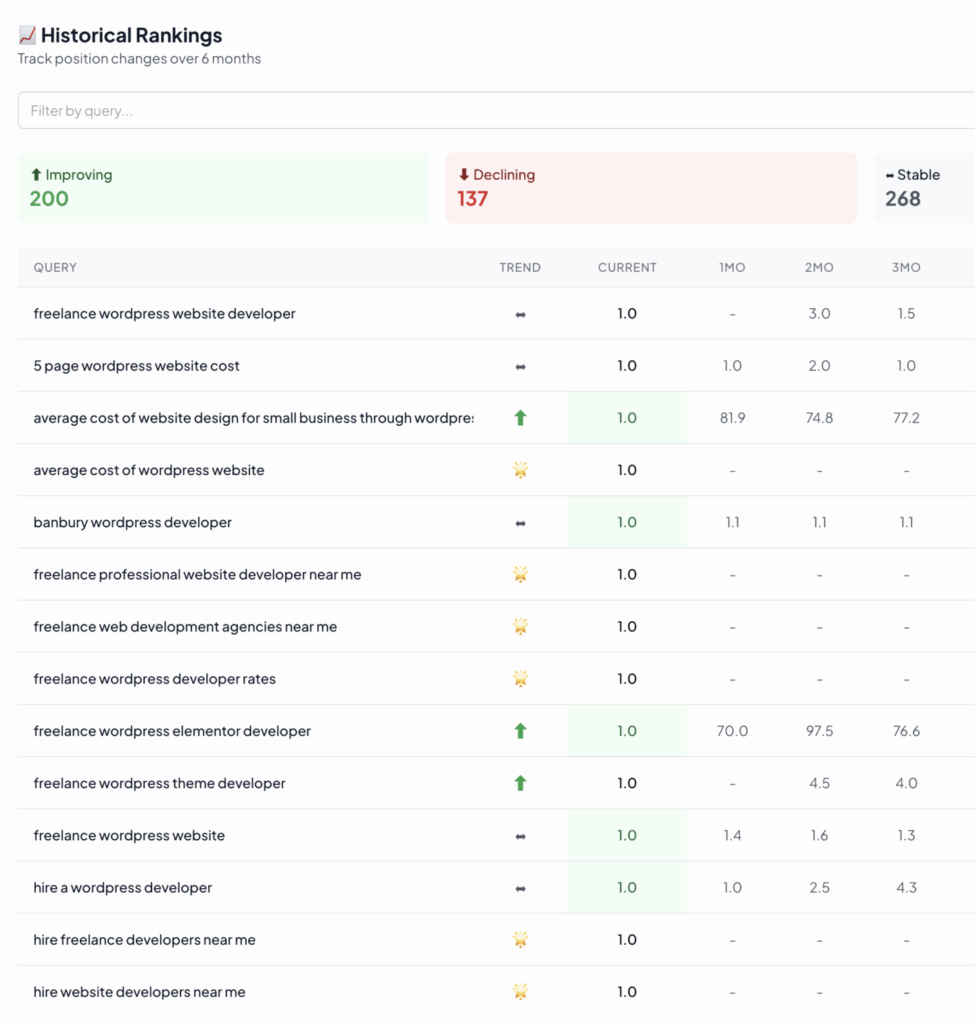
Above: see not only the queries, but the positions and the URLs that rank – you can’t get this data when using Google Search Console directly.
How it helps me see what’s working.
Once you connect your site, Serprocket automatically analyses your data and gives you an insight dashboard.
It highlights “quick wins” – keywords sitting just outside page one – and shows which queries are gaining impressions but not clicks.
That means you can focus on the pages that are already close to performing instead of endlessly guessing where to spend your time.
It also finds internal linking gaps and keyword overlap issues (cannibalisation), so you can tidy things up before they start dragging your site down.
Everything’s colour-coded and explained in plain English – no jargon, no complicated charts, just useful direction.
What I like most.
Serprocket gives you the “why” behind your SEO data.
I like that it doesn’t try to impress you with endless metrics; it just tells you what to do next. You can spot underperforming pages in seconds and get specific suggestions to fix them – like tweaking titles for better click-through rates or consolidating similar posts that compete for the same keywords.
It’s also great at surfacing new content opportunities.
The AI clustering tool groups related queries into themes, helping you plan what to write next without needing an expensive content strategist.
For a small team or solo operator, that’s a huge time-saver.
Who it’s for.
If you’re a small business owner who just wants to know whether your site is being found by the right people,
Serprocket will make your life easier. If you’re a freelancer or agency managing multiple sites, it’s perfect for reporting – clients can actually understand what you’re showing them.
And if you’re a content writer, it’s brilliant for spotting what topics and phrases your audience actually responds to.
Give it a spin: it’s free.
Most SEO tools give you too much data and not enough clarity.
Serprocket does the opposite – it gives you exactly what you need to make progress.
It’s affordable and the basic version is free. It connects directly to Google Search Console, and doesn’t try to reinvent the wheel.
It just helps you know whether your website is actually working.
If you manage your own site, or even a handful of client sites, give it a go.
It’s one of those tools that pays for itself quickly because it helps you focus your energy on what’s already starting to work.

David Foreman
Dave is a WordPress SEO expert with over 15 years experience in designing, building and optimising WordPress websites for small businesses that want to generate more new business from their websites. He's run a creative agency for 25+ years, employs 17 staff and enjoys a good rant about SEO.

